dLocShare
Share your location in seconds
Share your GPS location and a personal message by email. No installation, no registration, no complicated setup. Open the browser, get your position and send it in seconds.
Open Application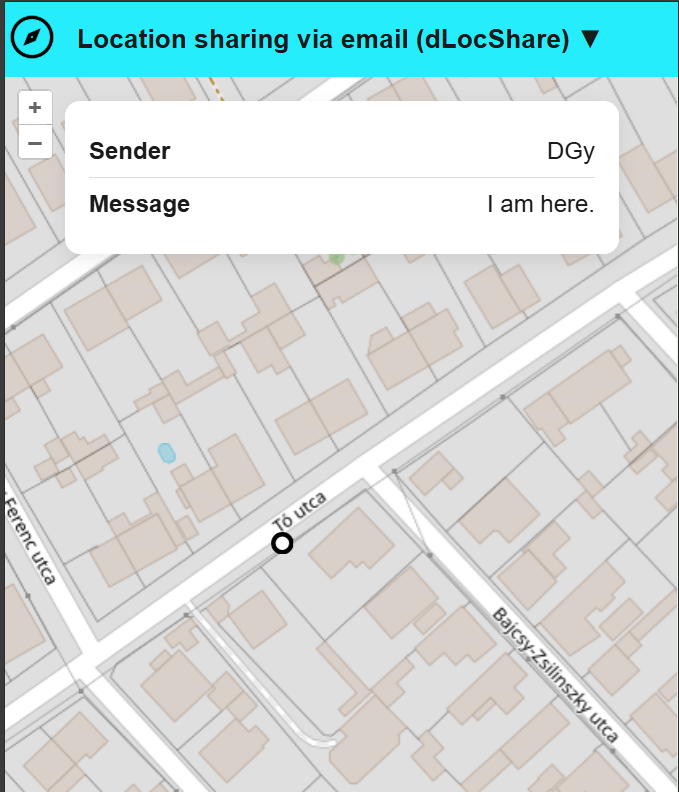
Share your GPS location and a personal message by email. No installation, no registration, no complicated setup. Open the browser, get your position and send it in seconds.
Open Application
Share your current position accurately using your device's location services.
Send your location and personal message directly to one or more recipients.
One-time location sharing without continuous tracking or background monitoring.
Open the application directly in your web browser.
dLocShare determines your current geographic location using your device's location services.
Enter the sender, select one or more recipient email addresses and an optional message, then share your location with a click.
Recipients receive an email containing a link that opens your shared location on an interactive map.
Sometimes you simply need to tell somebody where you are.
Whether you are meeting friends, travelling, hiking, waiting for pickup, or providing directions, dLocShare makes it easy to share your current location together with a personal message.
Instead of describing your position manually, send your exact location in seconds.
Let family members know where you are and when you are expected to arrive.
Share your location during hiking, cycling, camping, or other outdoor adventures.
Quickly communicate your position while travelling.
Send your exact location together with an important message when every minute counts.
Share your current GPS position within seconds. No complicated setup and no account creation required.
Works directly in modern web browsers on desktops, tablets and mobile devices.
Send location information and a personal message directly to your recipients by email.
Notify up to three recipients simultaneously, making coordination simple and efficient.
Recipients can instantly open and view the shared location on an interactive map.
Designed for occasional location sharing without the complexity of permanent tracking solutions.
dLocShare is designed for one-time location sharing, not continuous tracking.
Your location is obtained only when you explicitly request it and choose to send it.
Recipients receive only the location information and message that you decide to share.
No background tracking. No hidden monitoring. No permanent location history.
You stay in control of when, where, and with whom your location is shared.
Open dLocShare and send your current position in seconds.
Launch dLocSharedLocShare is a browser-based GPS location sharing service. It allows users to obtain their current geographic position and share it by email together with a personal message.
Recipients can open the received link and immediately view the shared location on an interactive map.